| Please read our Legal Disclaimer prior to executing any steps in this article |
Introduction
In this guide, we will overview where to find the serial number on all of the serialized DENSO equipment.
How to find and identify the serial number on robot arms.
How to find and identify the serial number on robot controllers
How to find and identify the serial number on teaching pendants.
Why is the serial number important?
- When communicating with DENSO about a specific piece of equipment, Denso must have the serial number in order to understand the specifics about the piece of equipment in question.
- Some pieces of equipment use different part numbers depending on the serial number of the item, as some parts have changed over time. Not providing a serial number makes some parts impossible to identify due to these revisions.
- Some licenses in the controller are tied to the serial number of the controller. If a serial number is not provided, some licenses cannot be generated. Licenses are used to expand the controllers hardware and software which allows for additional functions.
- When a DENSO Robot product is in need of service an RMA# must be issued. A RMA# cannot be issued without a serial number being provided.
Prerequisites
Understanding the different serial number formats.
DENSO utilizes 2 different formats for serial numbers on DENSO Robotics Products.
The original serial number format used from 198X ~ 2023
- The first two characters represent the month the product was manufactured so it can be 01, to 12.
- The third character represents the year the product was manufactured, and is always designated as a letter.
- The next three to four characters are a counter which indexes up by a value of 1 for each product manufactured.
- Occasionally there is a suffix of "R" on the serial number. Not all serial numbers end with a R character, but if it is included, be sure to provide Denso with information.
- A few examples of possible serial numbers: 05G166, 12E1016, 04P173R, 01B955R Etc.
The new serial number format: used from 2023 ~ present.
- The first and second characters represent the year and will always be numbers
- The third character represents the Month and will always be a letter
- The fourth character through the sixth or seventh character are a unique identifier
- Occasionally there is a suffix of "R" on the serial number. Not all serial numbers end with a R character, but if it is included, be sure to provide Denso with information.
- A few examples of possible serial numbers: 23F8010R, 26B4002, 22G5997R etc.
Step-by-Step Instructions
Step 1
- Find the label on the product.
| Teaching Pendants: The label on the teaching pendants is located on the back of the pendant. The label designates the model number, part number and serial number of the pendant. Please see image to right for example. | 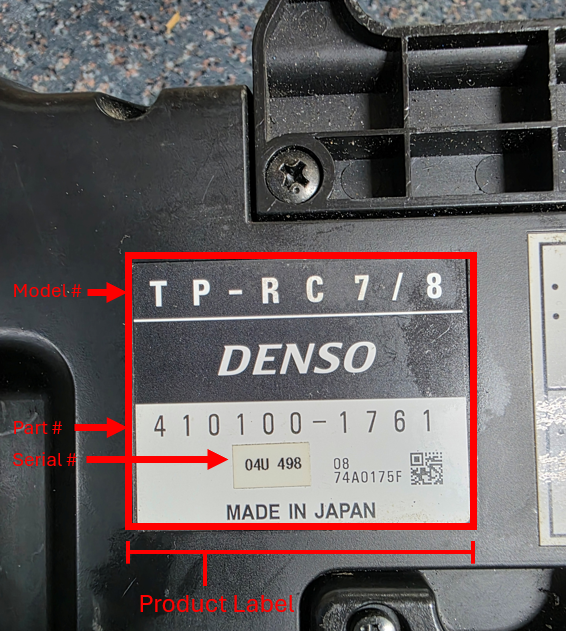 |
| CRC9 Controllers - (Label Serial #) The label on the CRC9 series controllers is located on the top cover of the controller near the back where the fans are located. This label designates the model number, part number, serial number, weight characteristics, electrical specifications etc. Please see image to right (above) for example. | 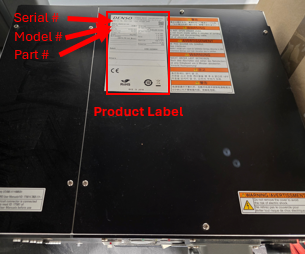 |
| CRC9 Controllers - (Internal Serial #) New equipment shipped from the factory will have matching internal serial numbers (software SN) and external serial numbers (cover SN). When purchasing a license, it is important to verify that the internal and external serial numbers match, as the license key is generated based on the controller's internal serial number. If the internal serial number does not match the serial number provided when the license key was generated, the license cannot be installed on the controller. | How to view the internal serial # RC8(A), RC9, CRC9ontroller |
| RC9 Controllers - (Label Serial #) dd The label on the RC9 series controller is located near the power cable on the right side of the controller. Please see image to right for example. | 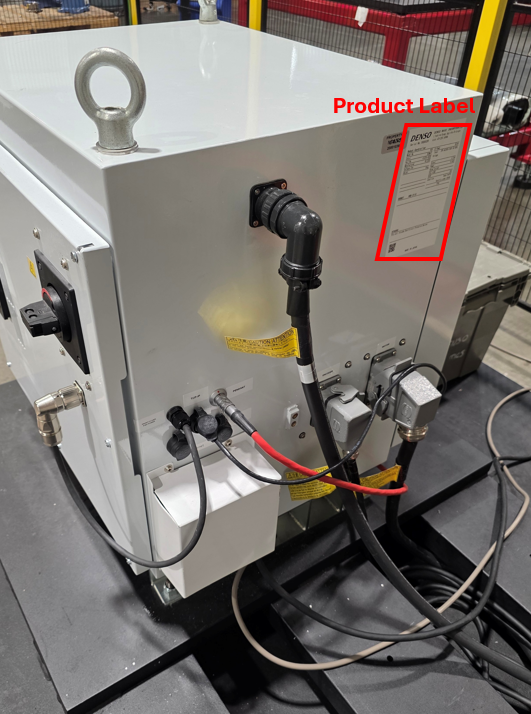 |
| RC9 Controllers - (Internal Serial #) New equipment shipped from the factory will have matching internal serial numbers (software SN) and external serial numbers (cover SN). When purchasing a license, it is important to verify that the internal and external serial numbers match, as the license key is generated based on the controller's internal serial number. If the internal serial number does not match the serial number provided when the license key was generated, the license cannot be installed on the controller. | How to view the internal serial # RC8(A), RC9, CRC9ontroller |
| RC8(A) Controllers - (Label Serial #) The label on the RC8(A) series controllers is located on the top cover of the controller on the upper left side. This label designates the model number, part number, serial number, weight characteristics, electrical specifications etc. Please see image to right (above) for example. Early RC8 series controllers also have a secondary serial number and model number label on the lower right corner of the top cover. This sticker was discontinued when the RC8A series was released. Please see picture to right (below) for example. The information on this label is the same as the larger main label. | 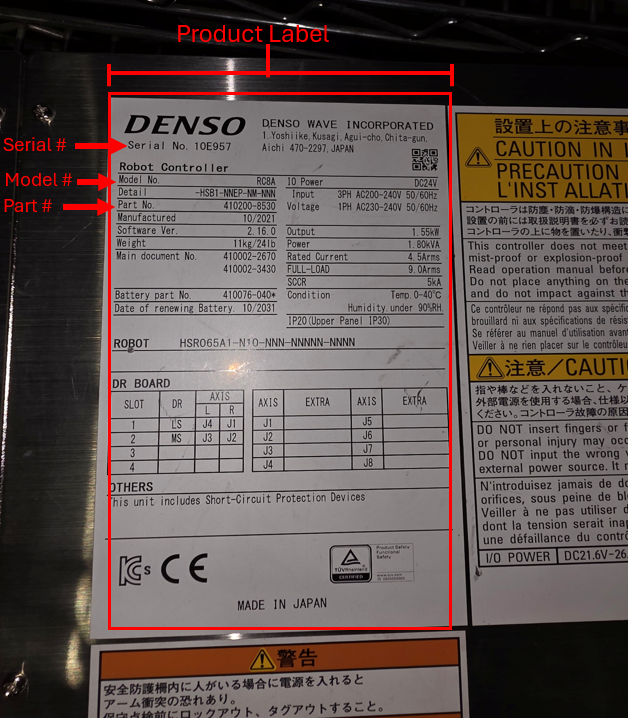 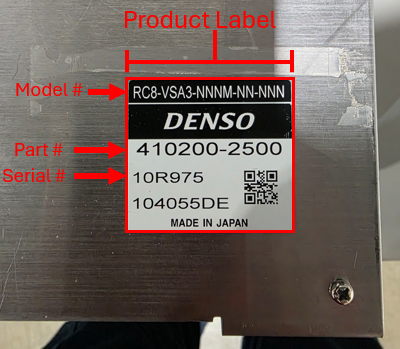 |
| RC8(A) Controllers - (Internal Serial #) New equipment shipped from the factory will have matching internal serial numbers (software SN) and external serial numbers (cover SN). However, if the top cover is removed and installed on a different controller, the internal and external serial numbers will no longer match. When purchasing a license, it is important to verify that the internal and external serial numbers match, as the license key is generated based on the controller's internal serial number. If the internal serial number does not match the serial number provided when the license key was generated, the license cannot be installed on the controller. | How to view the internal serial # RC8(A), RC9, CRC9ontroller |
| RC7M Controllers (Label Serial #) The label on the RC7 series controllers is located on the top cover of the controller on the upper left side. This label designates the model number, part number, serial number, weight characteristics, electrical specifications etc. Please see image to right (above) for example. All RC7M series controllers also have a secondary serial number and model number sticker in the lower left corner of the right side panel. The information noted on this label will match the top cover label unless the controller has been modified and the covers have been swapped with other controllers. | 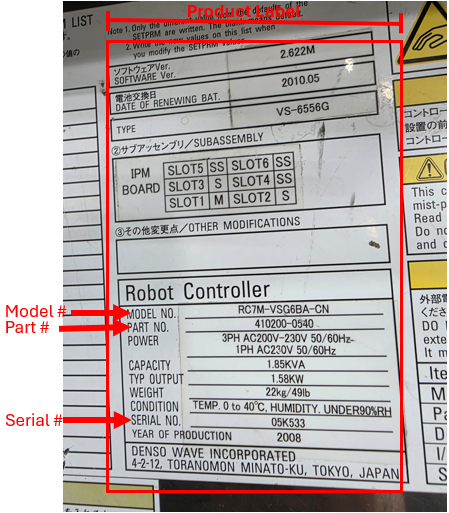 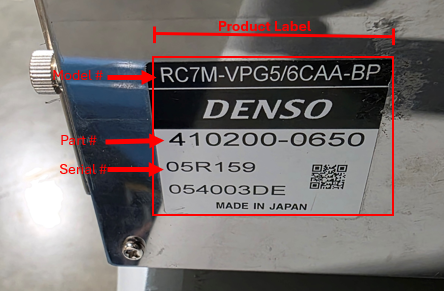 |
| RC7 Controllers - (Internal Serial #) New equipment shipped from the factory will have matching internal serial numbers (software SN) and external serial numbers (cover SN). However, if the top cover is removed and installed on a different controller, the internal and external serial numbers will no longer match. When purchasing an Ethernet IP license, it is important to verify that the internal and external serial numbers match, as the license key is generated based on the controller's internal serial number. If the internal serial number does not match the serial number provided when the license key was generated, the license cannot be installed on the controller. If the internal serial number does not conform to the standard serial number format noted at the beginning of this article, please contact DENSO for support as the internal Serial # inside the controller has been lost due to a dead memory backup battery. | Using a full sized teaching pendant: From the main screen push the "Set" button → "Options"→ "Extension". The Serial # will be displayed at the top of the new window that was opened. In the example below, the controller serial number displayed does not conform to the serial number format noted at the beginning of the article, and would require contacting Denso to recover the actual serial number. 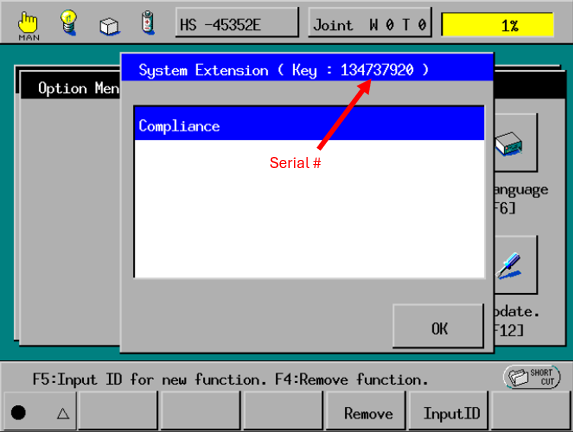 |
| VP, VSG, VSA, VM, VMB, HS, HSR, HM Series Robots The label for these robot models is located on the base of the robot. The exact location and label format has changed over the years but it is generically on the left side or right side of the robot near the panel the electrical and air connections attach to. Some examples of product labels are shown to the right. | 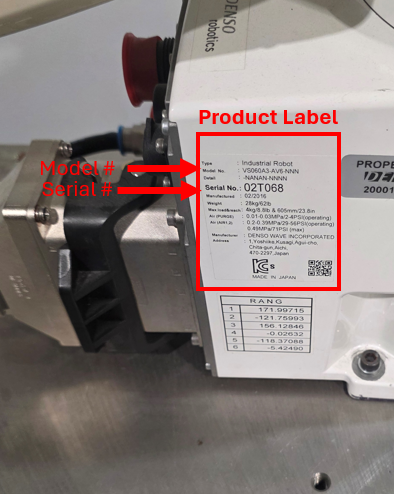 New product label shown above. Found to right of connector panel on VS060 series robot. New product label shown above. Found to right of connector panel on VS060 series robot.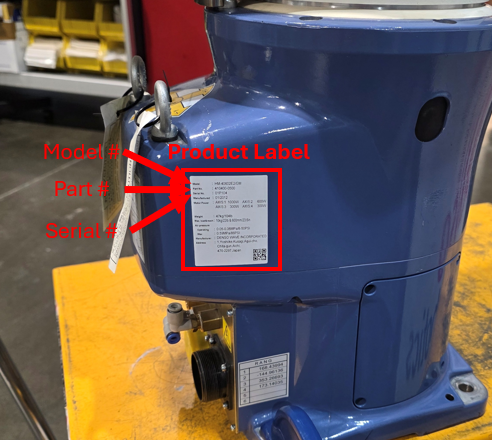 Newer Product label shown above. Found to the right of connector panel on HM series robot Newer Product label shown above. Found to the right of connector panel on HM series robot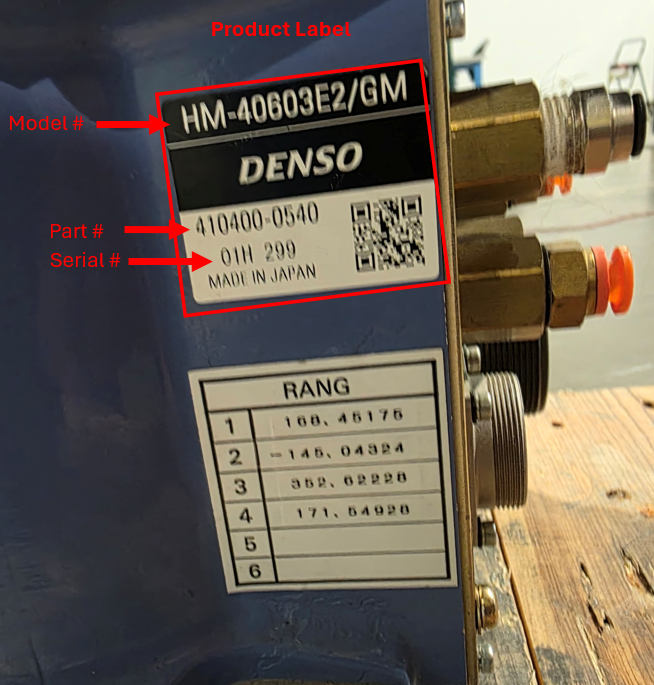 Old/Original product label shown above. Found to left of connector panel on HM series robot Old/Original product label shown above. Found to left of connector panel on HM series robot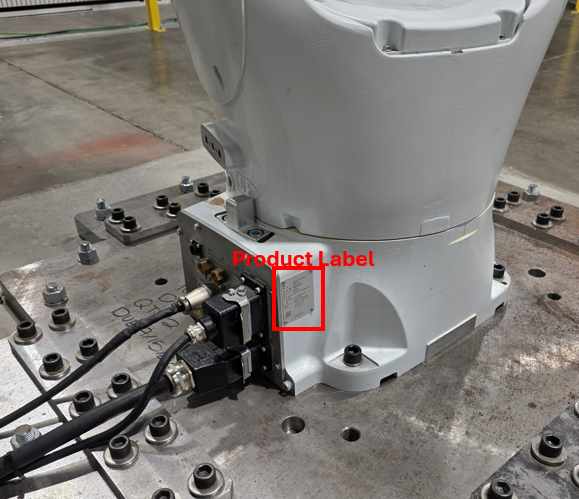 Newer Product label shown above. Found to the right of connector panel on VMB series robot. Newer Product label shown above. Found to the right of connector panel on VMB series robot. |
| XR Series Robots The label for the XR series robot is located near the CN22 connector where the Motor encoder cable attaches to the robot. Please see image to right for example. | 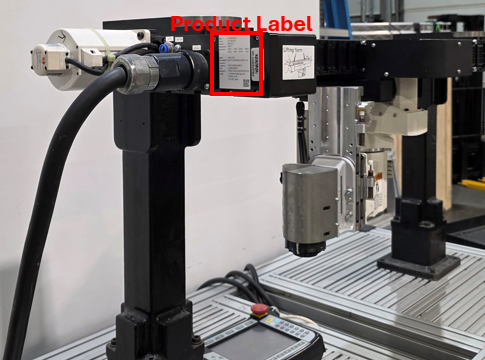 |
| VLA Series Robots The label for the VLA series robot is applied to the casting between the J1 and J2 motor. Please see image to right for example. | 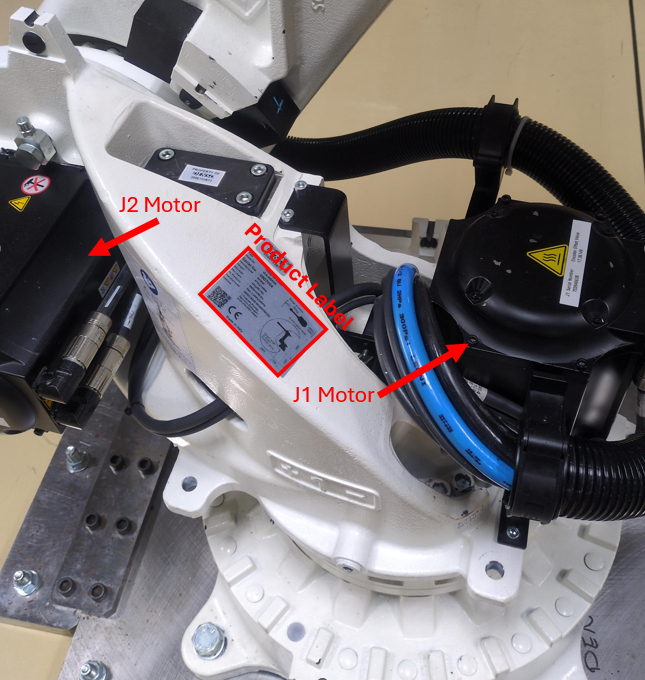 |
| Cobotta PRO / CVRB Robots The serial number label on the Cobotta Pro series robots is located on a metal plate riveted to the base of the robot. The serial number label is to the right of the connector plate. Please see image to right for example. | 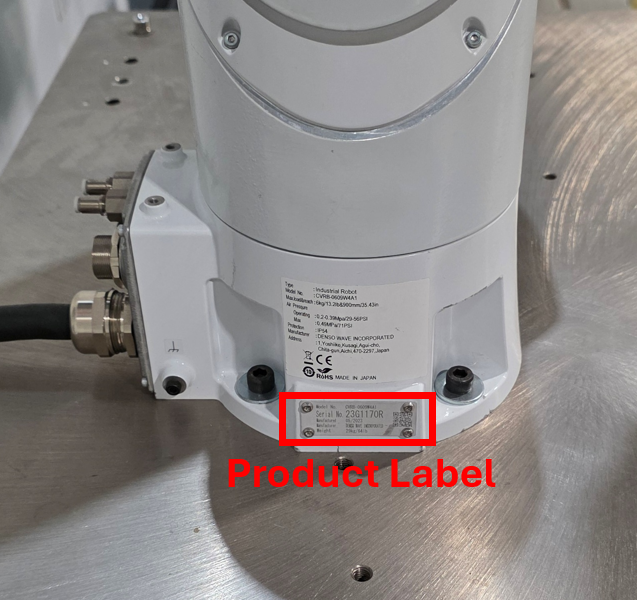 |
**Please note: Some product labels have changed over the years, so some product labels may look slightly different than the information shown above, but the information noted will still be included.
Tips
- Common issues occasionally encountered is confusing the part # of the robot with the serial number with the robot. Denso Robot part numbers always conform to a format of 6 numbers followed by a dash, followed by 4 more numbers - XXXXXX-XXXX. Serial numbers conform to the format noted at the start of this article.
- Occasionally when an IP rated robot is operating in a very wet or oily environment for a extended period, the label may come off. If the label happens to come off of the robot and the robot ends up needing to be sent to DENSO for service, please make note that the label has come off of the robot due to the environment it operates in.
Conclusion
This guide demonstrates the various serial number formats and the locations of the labels on teaching pendants, controllers, and robot arms.
Additional Resources
- For additional assistance, visit our online contact form at https://www.densorobotics.com/contact/
- Looking for onsite assistance? See our certified partners Regional Support Centers | DENSO Robotics
Was this article helpful?
That’s Great!
Thank you for your feedback
Sorry! We couldn't be helpful
Thank you for your feedback
Feedback sent
We appreciate your effort and will try to fix the article