Denso Robot RC8 / RC8A Controller How to Reset Encoder
| Please read our Legal Disclaimer prior to executing any steps in this article |
Introduction
This guide will provide an overview the encoder reset procedure for the RC8 and RC8A DENSO Robot controller. An Encoder Reset is the DENSO procedure to clear data from the encoder in a specified joint. Clearing data from the encoder can be useful in a few situations noted in the cart below. It is important to note that any joints that have encoders reset will also need to receive a calibration / calset after the encoder reset.
| No. | Cases when reset is necessary | Specific phenomena | Error Codes |
|---|---|---|---|
| 1 | If voltage supplied from batteries to motor encoder connectors is shut off while the controller is also off | (1) After motor is replaced, (2) After disconnecting a motors encoder from the wiring harness (3) When encoder backup batteries are dead. | 85404671, 85404672, 85404673, 85404674, 85404675, 85404676, 85404677, 85404678 |
| 2 | The motor speed exceeds the allowable value | Errors 8540469X (encoder counter overflow) occurs. | 85404691, 85404692, 85404693, 85404694, 85404695, 85404696, 85404697, 85404698 |
| 3 | An axis operates abruptly while controller is powered off. | Error of number 85404680s (encoder speed error with controller power OFF) occurs. | 85404681, 85404682, 85404683, 85404684, 85404685, 85404686, 85404687, 85404688 |
The Encoder Reset can also be used to erase the robots calibration / calset information. This feature can be useful if the robot was calibrated incorrectly and is unable to be moved to the correct calset position due to software limits.
This guide is applicable to all Denso RC8, and RC8A controllers.
Prerequisites / Materials
- A full sized teaching pendant is recommended to perform this task however a mini pendant is also capable of performing an encoder reset.
- 410100-1761 - Full Teach Pendant (4m cable) (RC7/8)
- 410100-1771 - Full Teach Pendant (8m cable) (RC7/8)
- 410100-1781 - Full Teach Pendant (12m cable) (RC7/8)
- 410100-1635 - Mini Teach Pendant (4m cable) (RC7/8)
- 410100-1645 - Mini Teach Pendant (8m cable) (RC7/8)
- 410100-1655 - Mini Teach Pendant (12m cable) (RC7/8
Step-by-Step Instructions
Step 1 - Login
Power on the controller and Login as a maintainer.
Push Cancel to return to main screen.
Step 2 - Navigate to Encoder Reset screen
Full Sized Pendant | Mini Pendant |
|
|
From main screen of full sized pendant:
| From Main screen of mini pendant:
|
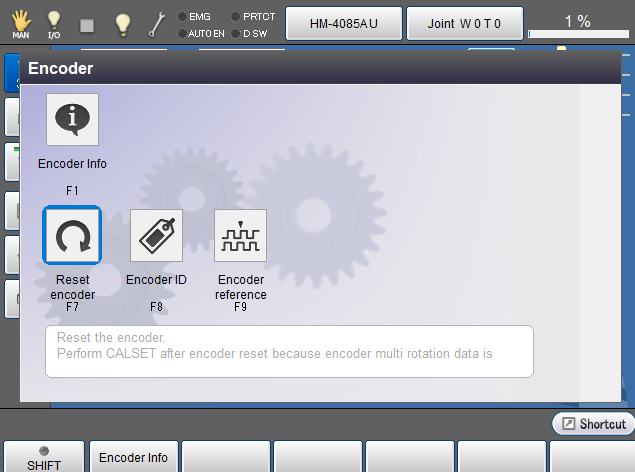
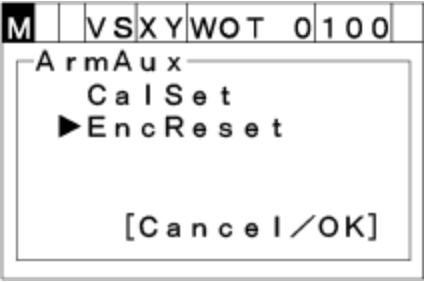
Step 3 - Select axis to reset
.
Full Sized Pendant | Mini Pendant |
|
|
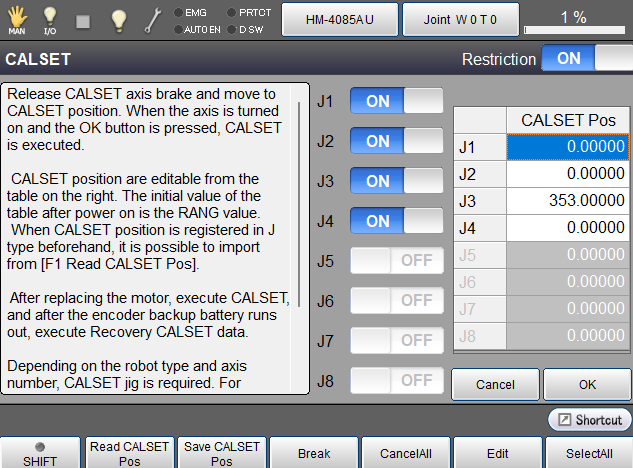
Encoders needing to be reset will be able to be selected. If there is a need to reset a joint that is greyed out, turn the Restriction to OFF.
Select the encoder needing reset
Push OK to reset the joint.
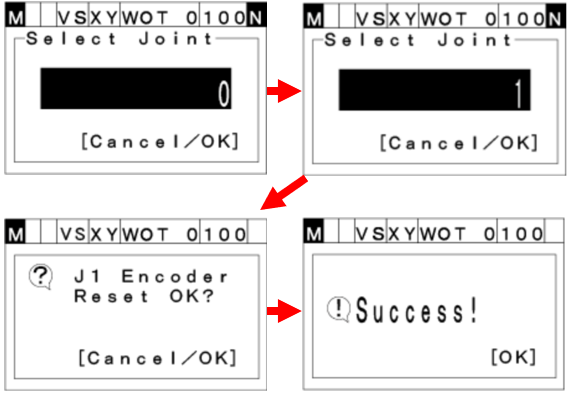
Read the system message and push OK or Cancel to either accept or reject the reset. | Use the number buttons on the mini pendant to enter the Encoder to be reset.
Push OK to reset the encoder
Read the system message and push OK or Cancel to either accept or reject the reset.
|
Step 4 - Power Cycle controller
If the encoder reset function was performed due to an encoder error such as JX encoder system down failure, JX encoder counter overflow, JX encoder speed over (any error code with the number 5 for second digit - ex 85404671) the controllers power will need to be cycled prior to running the robot.
If the encoder was reset for another reason such as needing the joint to erase its calibration information, please proceed to step 5 without a power cycle.
Step 5 - Calibrate the joint(s) that were reset in step 2 & 3
VS-6556 / 6577 Series Calibration
VM6083 / 60B1 Series Calibration
VS-050/060 Robot Calibration with Standard Flange
VS-050/060 Robot Calibration with IP67 Flange
VS-050/060 Robot Calibration with Communication Flange
VS-050/060 Robot Calibration with Clean Room Flange
VS-068/087 Robot Calibration with Standard Flange
VS-068/087 Robot Calibration with IP67 Flange
VS-068/087 Robot Calibration with Communication Flange
VS-068/087 Robot Calibration with Clean Room Flange
Troubleshooting & Tips
- After calibration it is recommended to confirm the application positions to verify the robot will run without crashing.
- After the application is confirmed to operate normally, it is recommended to get a backup of the system. WINCAPS III - Creating RC7/RC8 Backup
- Occasionally an issue can be encountered when performing an encoder reset to resolve encoder system down failure due to dead batteries. Sometimes after the encoders have been reset and power has been cycled, the encoder system down failure error occurs again. The encoder system down failure may happen again after a power cycle if the batteries in the robot are completely dead. In order to prevent this issue, new batteries need to be installed in the robot. Please see instructions on changing batteries for the various robot types below.
- HS Series Encoder Battery Replacement
- HM Series Encoder Battery Replacement
- HSR Series Encoder Battery Replacement
- XR Series Encoder Battery Replacement
- VP Series Encoder Battery Replacement
- VS-6556/6577 Robot Encoder Battery Replacement
- VM Series Encoder Battery Replacement
- VS-050/060/068/087 Series Encoder Battery Replacement
Conclusion
- This guide provides instructions on performing encoder resets on the Denso RC8 and RC8A controller using both the full sized pendant and mini pendant.
Additional Resources
- For additional assistance, contact support@densorobotics.com or visit our online contact form at https://www.densorobotics.com/contact/
- Looking for onsite assistance? See our certified partners Regional Support Centers | DENSO Robotics
- Online User Manuals (requires creation of username and password) USER MANUALS
Was this article helpful?
That’s Great!
Thank you for your feedback
Sorry! We couldn't be helpful
Thank you for your feedback
Feedback sent
We appreciate your effort and will try to fix the article