| Please read our Legal Disclaimer prior to executing any steps in this article |
Introduction
This guide will overview how to determine the age of the encoder backup batteries installed in a robot arm.
Encoder backup batteries are installed in the robot arms to maintain a robots calibration when the robots controller is powered off.
Encoder backup batteries are also installed in a robot arm to maintain its calibration when a robot is disconnected from the controller it was connected to.
Encoder backup batteries are designed to maintain a robots calibration for approximately 2 years of the controller being powered down (cumulatively) or 2 years of a robot being disconnected from a controller (cumulatively).
The batteries are not providing any power to the encoders while the controller is powered on
The factory DENSO Robot encoder backup batteries, like all batteries, naturally drain. The natural discharge will completely drain the battery after a period of approximately 10 years.
There is a battery replacement function on all Denso controllers. This function will notify users that the batteries need to be replaced via an error code. The battery replacement date function is however manually set, so if setting the replacement date is skipped when the batteries are replaced, the information on this screen won't be applicable. DENSO highly recommends utilizing this function to aid in knowing when to replace the batteries in the robot arms.
The official DENSO stance on battery replacement is to replace the encoder batteries every 2 years to reduce the chance of loosing robot calibration during a controller power off event.
Given the information noted above, knowing the age of an encoder backup battery, and the date the battery was installed is important to know to prevent unwanted loss of robot calibration.
Prerequisites
Please review the Changing encoder backup battery procedure for the robot in question to understand where the encoder backup batteries are located within the robot.
- Denso only installs the Toshiba ER17500V batteries in the robots as depicted in the image below. If the robot in question does not have Toshiba ER17500V batteries installed, the batteries are aftermarket and the information in this article is not applicable.
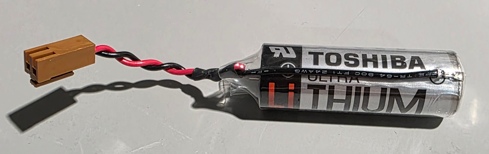
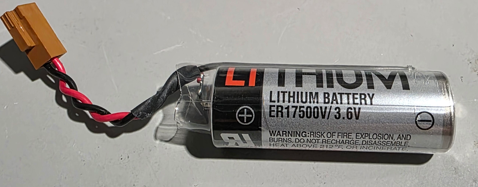
- If the batteries found in the robot do not have a 3 character date code or a 6 character date code, the batteries are aftermarket, and the information in this article is not applicable.
- The part numbers for Denso Robot Encoder backup batteries are
- Kit with 2 batteries - 410679-001*
- Kit with 3 batteries - 410611-007*
- Kit with 3 batteries - For VP-G2 series only - 410076-024*
- 1 battery for additional axis - 410611-003*
Step-by-Step Instructions
Step 1 - Locate the batteries
If the batteries are still in their factory packing in a parts crib, it will be necessary to unpack the batteries from their factory packing to view the information printed directly on the batteries.
For batteries currently installed in a robot arm - Locate the encoder backup batteries inside of the robot. Do not disconnect the battery from the circuit board. As noted above, please review the replacement procedure for the robot model in question to identify where the batteries are located inside of the robot. - Changing encoder backup battery
Note: Do not disconnect the batteries from the circuit board.
Note: Additional axis batteries will be located near the additional axis servo motor
Step 2 - Determine the age of the batteries
Two systems existed for notating the date of a battery.
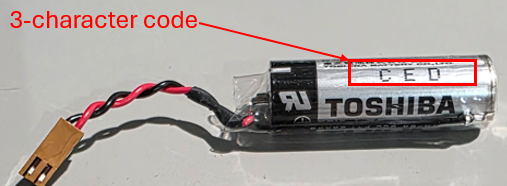
- The original system used a 3 character code ( something like WYG, or CED). The 3 character code system was discontinued approximately 2018 so any batteries with a 3 digit code are at, or near expiration and should be replaced. Please see the image below for an example of a battery with the 3 character date code.
- The new system used for denoting manufacture date consists of 6 characters. The important characters are the first 4 characters. The first 2 characters denote the year of manufacture. The 3rd and 4th character denote the month of manufacture.
- For example a battery with a code of 2407SM. In this case the "24" d means the battery was manufactured in 2024. The 3rd and 4th characters "07" means the battery was manufactured in July / 7th month.
- An example battery with a 6 character code is shown below.
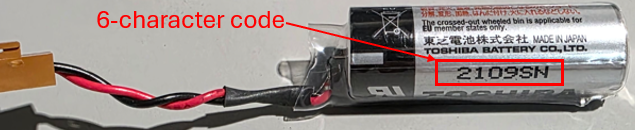 This battery has a code of 2109SN. the "21" means the battery was manufactured in 2021. The "09" means this battery was manufactured in September.
Troubleshooting & Tips
- Keeping batteries in stock for long periods can lead to situations where the battery may have expired prior to it being installed in a robot arm. DENSO recommends purchasing batteries as they are needed.
- Keeping batteries in stock is good practice in the event a robot experiences battery failure, but it is not recommended to stock batteries in bulk, as stocking more batteries increases the likelihood that the batteries will expire prior to being needed.
- Following the DENSO recommended ~2 year battery replacement schedule mitigates situations where calibration data will be lost during a controller-power-off event.
- In addition to setting the next battery replacement date, it is good practice to notate the replacement date on the robot body. Many users write out the battery replacement date, or print out a label noting battery replacement date. *See Additional Resources section below for links on setting battery replacement date*
Conclusion
- This guide demonstrates identifying age of the DENSO robot encoder backup batteries.
- In the event the batteries are being replaced because they have completely died and the encoders are now generating "Encoder system down failure" errors.
Additional Resources
- In the event the batteries are being changed please see the following article(s) on setting the next battery replacement date
- For additional assistance, contact support@densorobotics.com or visit our online contact form at https://www.densorobotics.com/contact/
- Looking for onsite assistance? See our certified partners Regional Support Centers | DENSO Robotics
- Battery Recycling resource - Drop-off Locations - The Battery Network
Was this article helpful?
That’s Great!
Thank you for your feedback
Sorry! We couldn't be helpful
Thank you for your feedback
Feedback sent
We appreciate your effort and will try to fix the article